Supported
FLIR radiometric JPEG
The .jpg files saved by FLIR handheld cameras and many OEM cores, with the raw sensor data and calibration stored inside.
Thermal image analysis · Mac and Windows · works offline
Read temperatures from FLIR and InfiRay / Topdon files in one app, measure spots, boxes and lines, and export a branded inspection report in one click. DJI, HIKMICRO and Fluke files are next in line.
Get HeatDeck for Mac or Windows
FLIR radiometric JPEG and InfiRay / Topdon .irg today · files stay on your computer · cancel Pro any time.
How it works
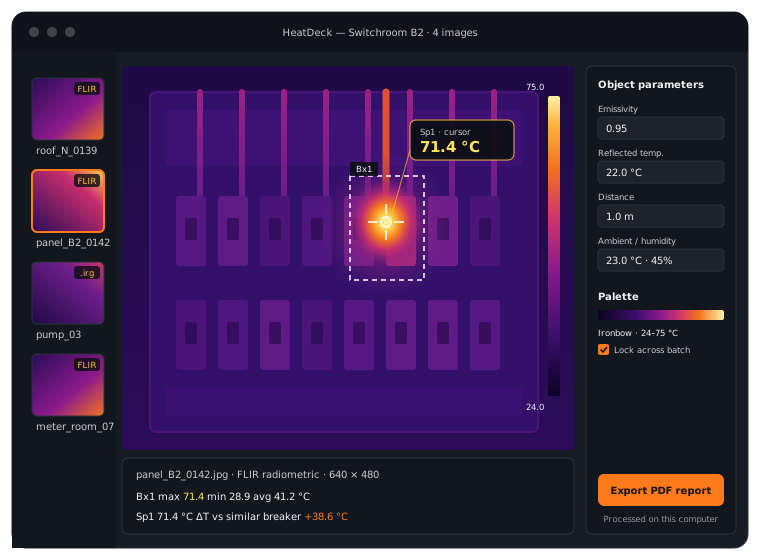
HeatDeck reads the radiometric data inside each file, whichever camera took it, and lays the batch out as thumbnails with the visual photo beside each thermal one.
Hover for the temperature under the cursor. Draw spots, boxes and lines for min, max and average. Set emissivity, reflected temperature and distance per image or for the whole batch, and every reading updates.
Lock one palette and temperature range across the batch so images compare fairly, then export a PDF inspection report with your logo and notes, or radiometric TIFF and CSV for further analysis.
Live readout as you move, plus spot, box and line tools with min, max and average.
Lock palette and span so a hot spot looks equally hot in every image of the report.
Change the object parameters after the fact and the temperatures are recomputed from the raw data.
Radiometric TIFF and CSV for every image in one go, for Excel, Python or GIS.
Your logo, the thermal and visual images side by side, measurements in a table, your notes.
Everything runs on your computer. No account is needed to open a file, and no image is uploaded.
Formats
Radiometric files carry a temperature for every pixel. HeatDeck reads that data directly, not the coloured picture.
The .jpg files saved by FLIR handheld cameras and many OEM cores, with the raw sensor data and calibration stored inside.
Radiometric captures from InfiRay-based cameras, including Topdon models.
Radiometric JPEGs from DJI drone cameras such as the M3T, M30T and H20T.
Radiometric images from HIKMICRO handheld cameras.
Fluke's thermal image format, with the visible-light image and annotations.
HeatDeck vs. the tools you have
| Tool | Limitation | Price |
|---|---|---|
| FLIR Thermal Studio | Windows only, FLIR files only | $216–432 a year |
| Brand apps (HIKMICRO, Testo, DJI) | Windows only, one brand each | Free |
| Blackbody | Linux only, no reports | Free |
| ThermoConverter | A batch converter, not an analysis app | About $1,000 |
| HeatDeck | Mac and Windows, mixed brands in one batch, PDF reports | Free tier · $19/mo or $149/yr |
Brand names describe file compatibility only. HeatDeck is independent and not affiliated with any camera maker.
Pricing
Open and measure up to 10 images a day for free. Pro removes the limit and adds batch export and PDF reports.
$0
For checking the odd file a client sends you.
Get HeatDeck for Mac or Windows
FLIR radiometric JPEG and InfiRay / Topdon .irg today · files stay on your computer · cancel Pro any time.
$19/ month
For inspectors who write reports every week.
Get HeatDeck for Mac or Windows
FLIR radiometric JPEG and InfiRay / Topdon .irg today · files stay on your computer · cancel Pro any time.
$149/ year
Everything in Pro for about $12.40 a month.
Get HeatDeck for Mac or Windows
FLIR radiometric JPEG and InfiRay / Topdon .irg today · files stay on your computer · cancel Pro any time.
Prices in USD. HeatDeck is for building, electrical, mechanical and solar inspection. It is not a medical device and is not for fever screening.
Thermal images show the inside of people's homes, plants and switchrooms. HeatDeck processes every file on your own machine: nothing is uploaded, nothing needs an account to open, and it works on a roof with no signal. Reports are written to your disk and go only where you send them.
Enter your email and we send the download link for Mac or Windows. The free plan opens 10 images a day, no card needed.
Get HeatDeck for Mac or Windows
FLIR radiometric JPEG and InfiRay / Topdon .irg today · files stay on your computer · cancel Pro any time.
Yes. HeatDeck runs natively on macOS and opens FLIR radiometric JPEGs with full temperature data: the reading under the cursor, spot, box and line measurements, and emissivity correction. You don't need Boot Camp, a virtual machine or a Windows PC.
FLIR's Mac app is discontinued, and FLIR Thermal Studio runs on Windows only. HeatDeck covers the everyday FLIR Tools jobs on a Mac: reading temperatures, adjusting parameters, setting palettes and writing a report.
For opening, measuring and reporting, yes, and it also reads InfiRay / Topdon files in the same batch. It costs $149 a year against $216–432 for Thermal Studio, and it runs on Mac as well as Windows.
DJI R-JPEG support (M3T, M30T, H20T) is in progress and is marked as coming soon. Today HeatDeck opens FLIR radiometric JPEG and InfiRay / Topdon .irg files.
HIKMICRO support is coming soon. When it ships, HIKMICRO images will open in the same batch as your other cameras.
Yes. Pro exports a whole batch to radiometric TIFF (one temperature value per pixel) and CSV in one step. R-JPEG to TIFF follows once DJI support is out.
HeatDeck's PDF report is the template: your logo, the thermal and visual images side by side, measurement tables, object parameters and your notes, laid out automatically for every image you select.
No. Every file is read and processed on your computer. HeatDeck works fully offline.
No. HeatDeck is built for building, electrical, mechanical and solar inspection. It is not a medical device.